Autore: Luca Micheletti

  • How reset sysadmin or security-officer password on Dell Power Protect

    How reset sysadmin or security-officer password on Dell Power Protect

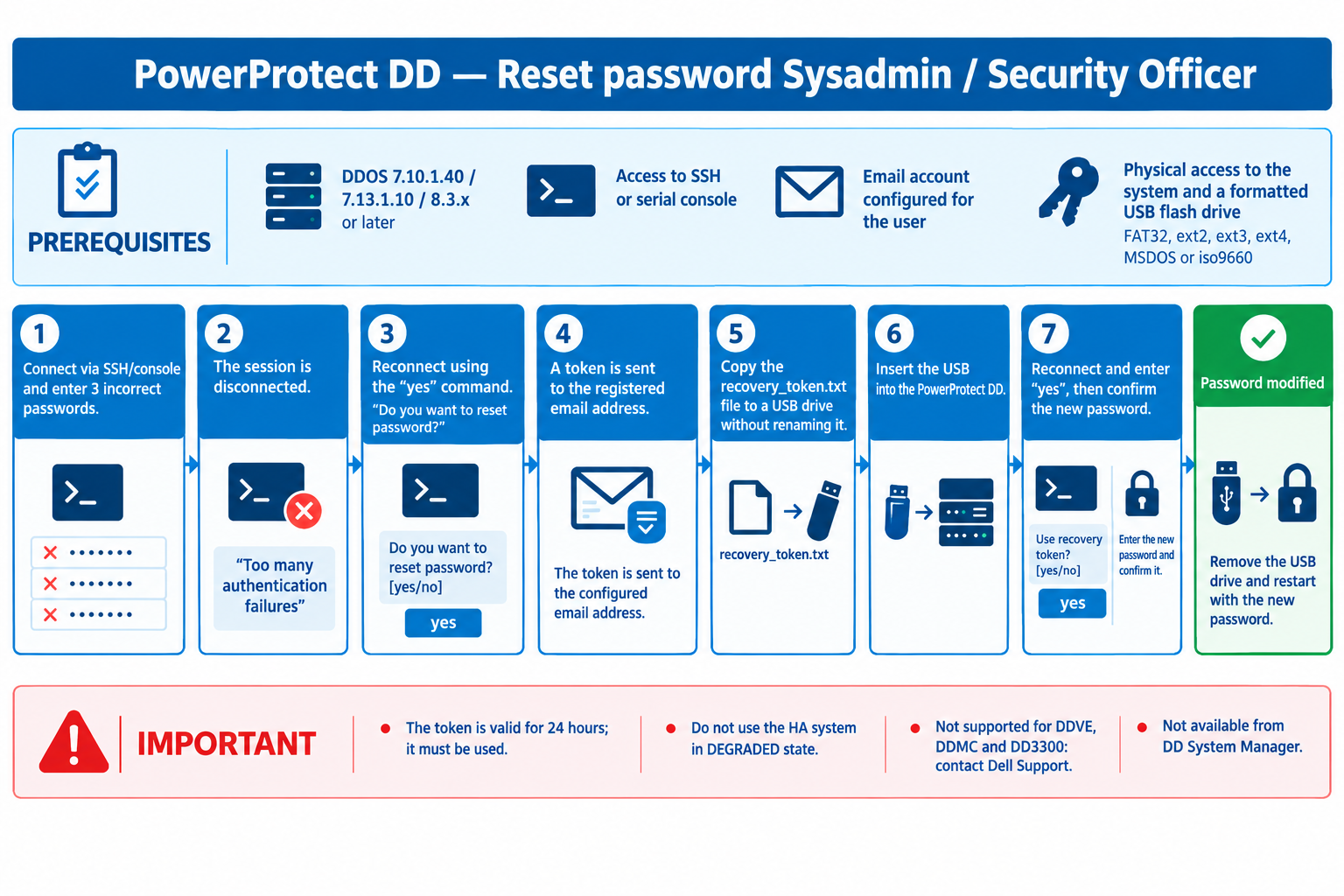
    Did you know that to reset your password, all you need to do is set up a recovery email?

    From ddos version 7.10.1.40 is possible to reset passwords with a recovery email that needs to be configured. This reset no longer require Tech Support intervention.

    At the moment the procedure is available by ssh o serial console.

    You can find the official documentation here:

    mi puoi creare una immagine con il flusso che trovi a questo link ? https://www.dell.com/support/kbdoc/en-us/000291519/powerprotect-dd-how-to-reset-sysadmin-or-security-officer-password

  • Securing your network with Meraki (802.1x+Access Manager+Entra id+EAP-TTLS)

    Securing your network with Meraki (802.1x+Access Manager+Entra id+EAP-TTLS)

    Do you want to manage the access to you network on a friendly and simple way?

    No problem, you can do it with Access Manager integrated in the Meraki dashboard.

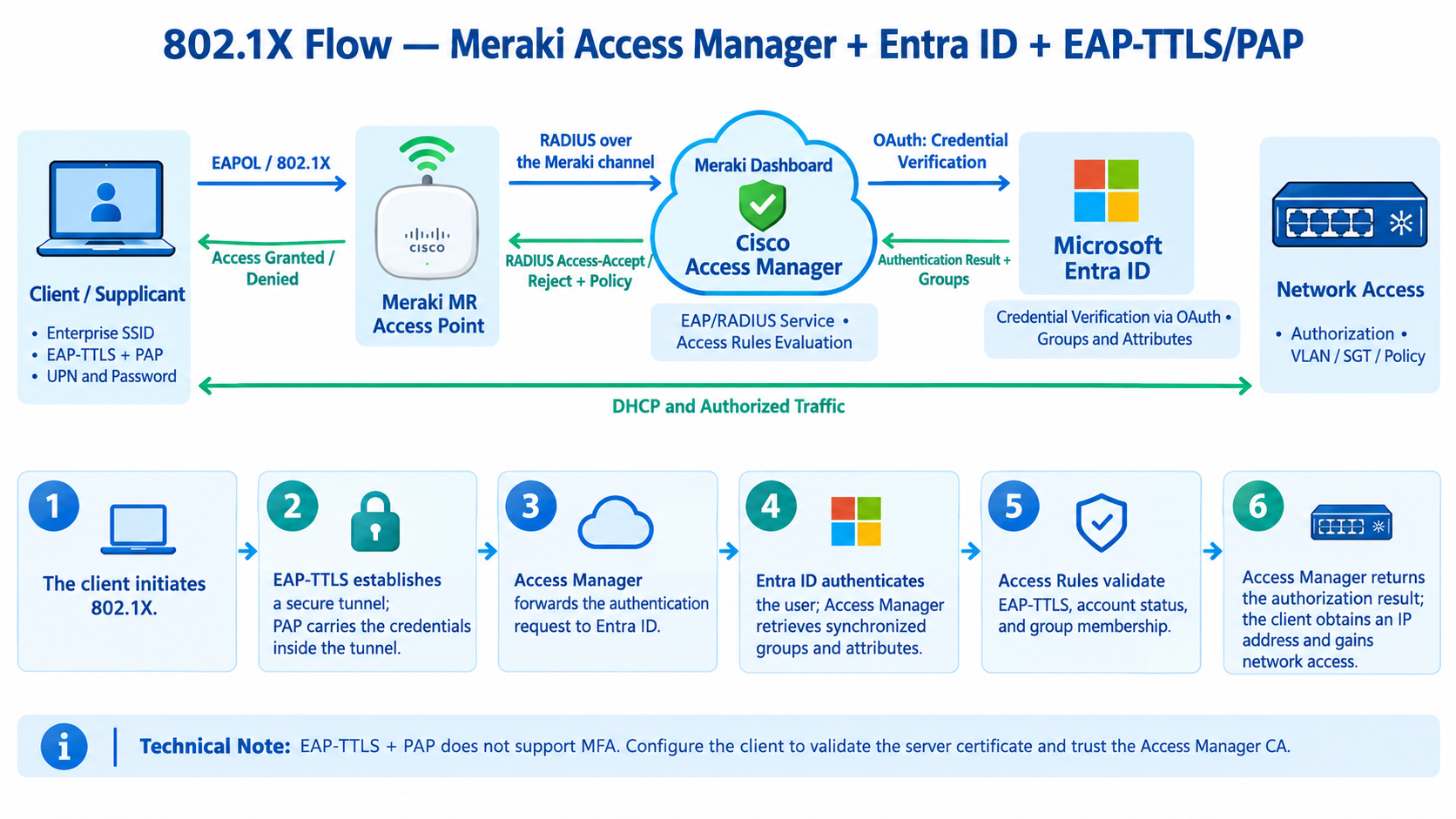
    Here is the authentication flow diagram for Cisco Meraki Switches, APs + 802.1X + Access Manager integrated into the Dashboard + Microsoft Entra ID + EAP-TTLS/PAP.

    The diagram illustrates the credential flow, identity verification, policy evaluation, and network access authorization.

    The sequence is based on the official Cisco Meraki documentation.

    How the Flow Works

    • Client / Supplicant: Initiates 802.1X authentication and provides the UPN and password.
    • Meraki AP or Switch: Carries the EAP exchange to Cisco Access Manager.
    • Access Manager: Receives the credentials via EAP-TTLS/PAP and forwards the verification request to Entra ID via OAuth.
    • Microsoft Entra ID: Verifies the credentials; Access Manager retrieves the user’s groups and attributes.
    • Access Rules: Evaluates the conditions, such as the EAP-TTLS protocol, enabled account status, and membership in the Employees group.
    • Authorization: Access Manager returns the result to the Meraki device, which applies the appropriate authorization, such as VLAN or SGT assignment, according to the configuration.

    Important Technical Note: EAP-TTLS/PAP does not support MFA with Access Manager. It is also essential to configure the client to validate the server certificate and trust the appropriate CA.

    For more information, refer to the official Cisco Meraki guide to EAP-TTLS/PAP username and password authentication with Entra ID.
  • Don’t panic about certificate renewals

    Don’t panic about certificate renewals

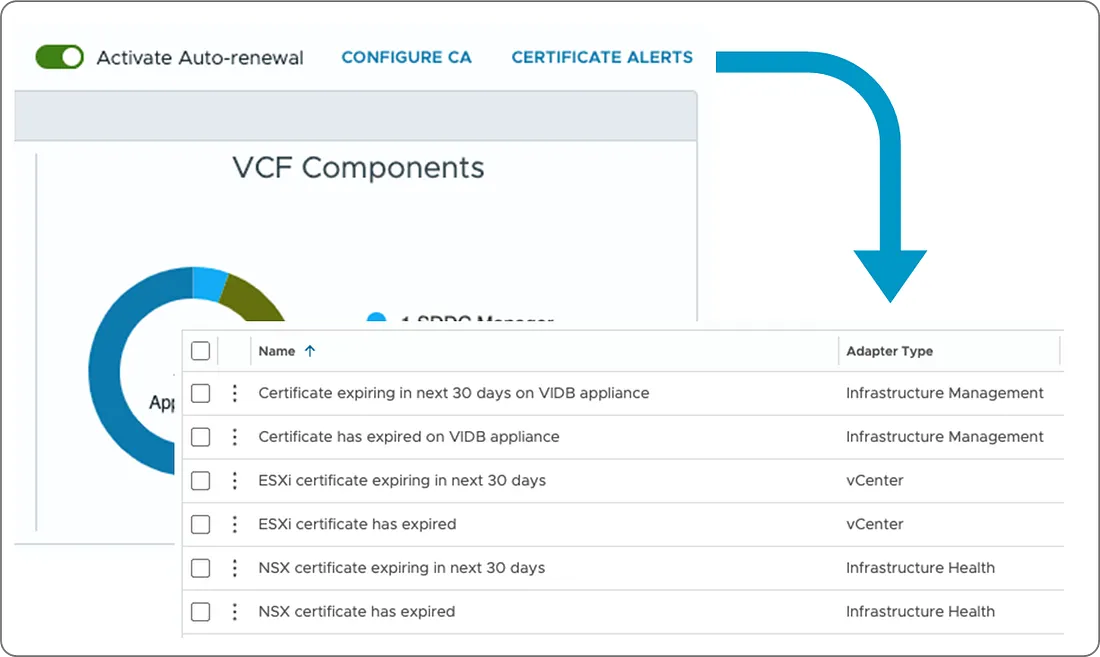
    About more news features on new “VMware(R) Cloud Foundation 9” I think one of all need mension is the unified certificate management within VCF Operations.

    This feature facilitates smooth, non-disruptive certificate updates, automatic renewals with multiple Certificate Authorities, and the ability to import externally signed certificates.

    Consequently, it resolves operational difficulties, enhances security measures, and ensures greater compliance.

    Do you remember when your vCenter’s certificate expired resulting in a backup crash and related panic?

    Now with this long-awaited and long-requested feature, this will no longer be a problem we have to face !